
UX Portfolio Design › Chapter 4
Chapter 4 · Free to read
Designing for busy people
If there’s one thing that hiring managers and recruiters have in common, it’s lack of time.
Hiring managers are typically reviewing portfolios in the few minutes between meetings. They’re often in a hurry, needing to draw up a list of potential candidates for an immediate vacancy. They only have a little time.
Recruiters have a similar challenge. Every moment they spend reviewing a portfolio is time they could use talking to a candidate or client. Their job is to connect people. And often, that’s what they enjoy doing.
In 2012 the job site TheLadders revealed that recruiters spend about 6 seconds reviewing a CV or résumé before they make the initial ‘fit/no fit’ decision.
When it comes to portfolios, the situation is a little better. My research suggests you have 30 seconds or less to make a good impression.
There is one significant difference between recruiters and hiring managers:
- External recruiters are interested in fielding as many candidates as possible. They will review portfolios to rule candidates in.
- Hiring managers want the shortest shortlist they feel comfortable with. They will be looking to rule people out.
In both cases, success is more likely if you design your portfolio for busy people.
Attractive products are perceived as more usable
How your portfolio looks is important.
In my research, I asked hiring managers to show me a portfolio that greatly impressed them. Each time, the portfolio was beautiful, not just well-written.
As Donald Norman wrote, “Aesthetics matter: attractive things work better. Good design means that beauty and usability are in balance.” Hiring managers, it seems, succumb as much as anyone to the aesthetic usability effect.
If you do not have graphic design skills, you may feel a little sad at this point. Fear not — the most beautiful UX portfolio didn’t always result in a successful hire following the interview.
But the visual appearance of your portfolio — layout, typography, colour — must support your overall message. Otherwise, it will detract from it.
Shorter portfolios generally work better
There’s a UX portfolio online that so-called experts recommend as best in class. I removed the client’s name from one of its case studies and put it in front of hiring managers. It didn’t do well.
The critical problem was its length: 6,200 words. This would take a hiring manager around 25 minutes to read.
And that’s just a single case study, not the whole portfolio. No hiring manager has the time to review a portfolio of that length, let alone a single case study.
So, keep your portfolio short. As a rule of thumb, a PDF-based portfolio shouldn’t run more than 15 pages, even if you’re experienced.
With an online portfolio, lead with your most relevant work.
De-prioritise lower-value case studies, either visually or by placing them within an archive section.
Design your portfolio for the fast and slow track
Remember: the purpose of your UX portfolio is to get you an interview. Hiring managers don’t need your life story or a detailed account of your research or design process.
Your portfolio needs to demonstrate your ability to synthesise, prioritise, and communicate essential information about you.
Your portfolio needs to work on two tracks:
- The fast track, where the critical information about you and your work is immediately apparent.
- And the slow track, where the critical information about you and your work is explained and fleshed out.
Graphic design tips
In this section, I will introduce fundamental graphic design principles and tips to help you deliver an attractive portfolio that provides reviewers with both fast and slow tracks. It’s not intended to be an in-depth summary of graphic design techniques, but I hope it will get you on the right path. No pun intended.
Use a grid
Whether your portfolio is online or PDF, align typography, images, and graphics to a grid. It’ll bring consistency and visual harmony to your page layout. Your portfolio will look neat, clean, and composed. Reviewers will find it easier to navigate through your content.
Maintaining your portfolio will also be easier as you have made many layout designs while choosing your original grid structure, and you won’t need to make these decisions again.
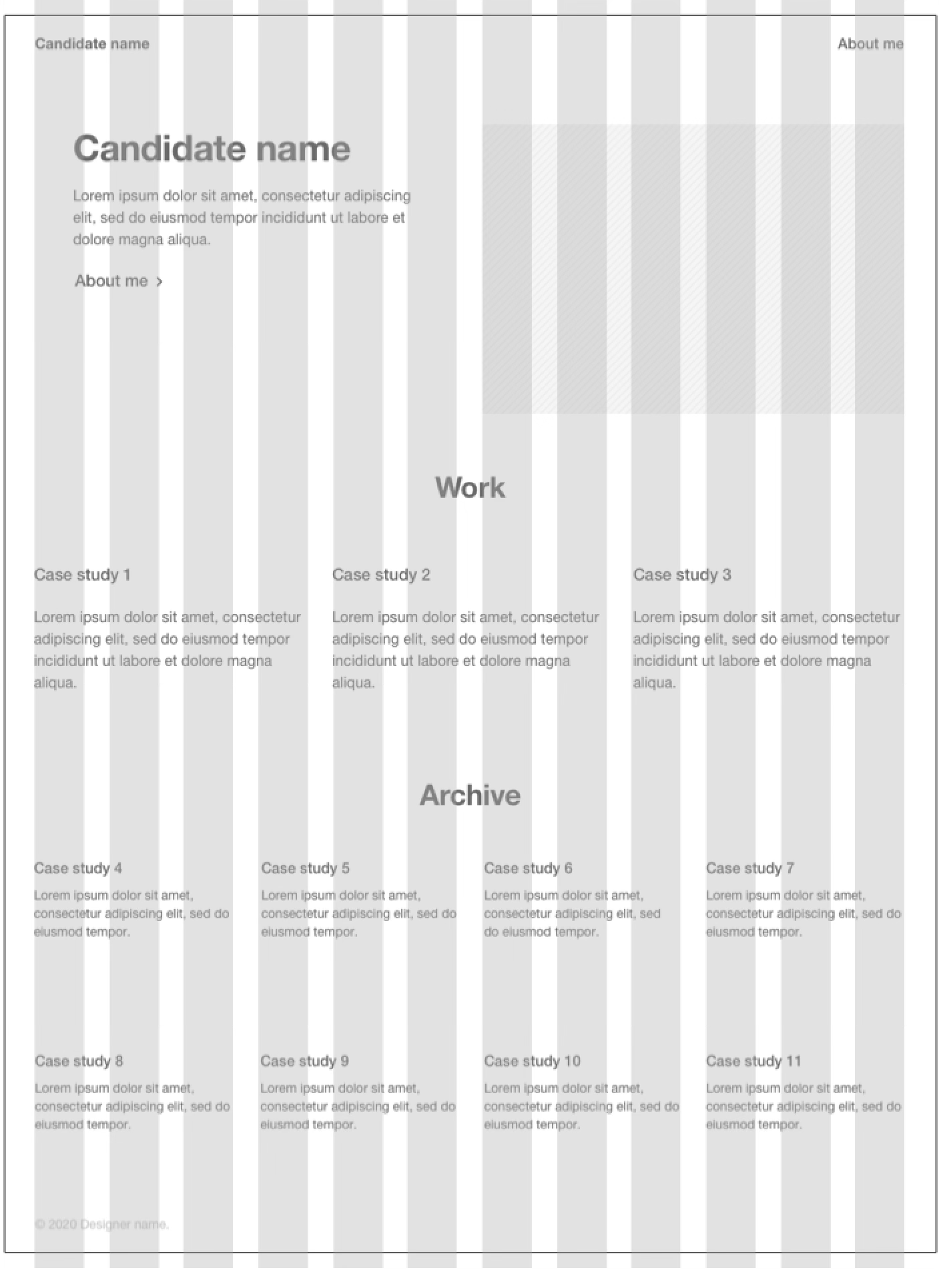
A simple landscape grid works best for a PDF-based portfolio that could be printed or read on-screen. For the web, designers often opt for a grid with 12 or 24 columns, as 12 and 24 are divisible by 2 and 3. This offers the most flexibility regarding how many elements can be positioned in a row.
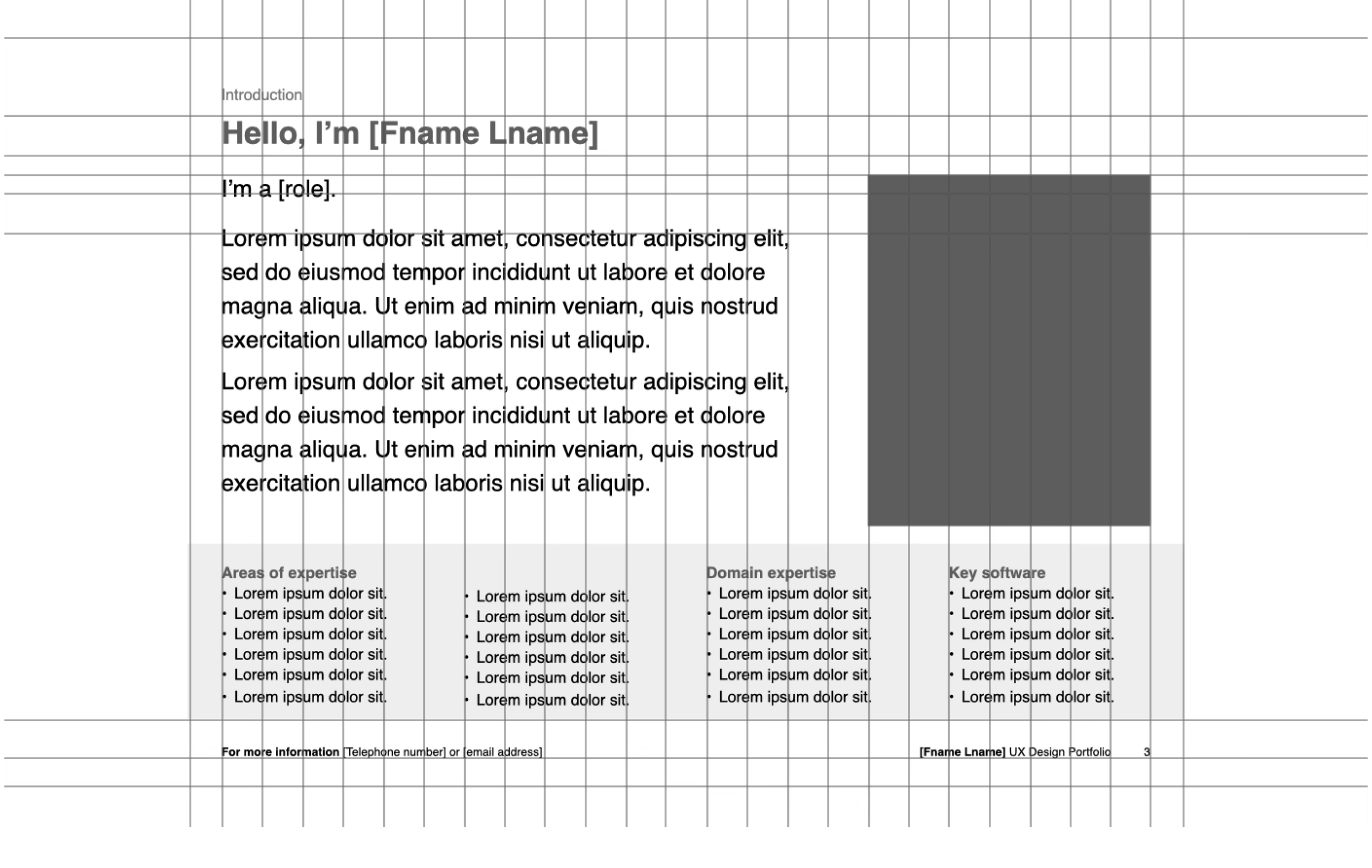
For PDF portfolios, include ‘folios and footlines’
If creating a PDF-based portfolio, don’t forget to have room in your grid for ‘folios and footlines.’
In print publishing, folios are page numbers. Number the pages so you can refer to specific items easily during a screening call or interview.
In an online portfolio, ensure your contact details are always visible
If you have an online portfolio, add your name and contact details to the footer of each page.
Use white space
When you lay out your portfolio, don’t pack everything in. It makes your portfolio more difficult to use. It creates the wrong impression. Use white space. Allow your text and images to breathe.
Think about typography
Typography is a crucial way to reflect your personality in your portfolio. Still, it should also be invisible — reviewers should never become aware of the act of reading, or they may stop.
Your choice of typeface is more critical in headlines, but the body copy also has a feel. With both, keep it professional. Choose for your portfolio reviewers, not yourself.
Unless you have visual design expertise, stick to two typefaces at the most. Contrasting fonts will provide the maximum effect — for example, Gill Sans and American Typewriter.
Whichever typefaces you choose, make sure they are legible. Safe bets include Baskerville, Bembo, Bodoni, Caslon, Clarendon, Frutiger, Futura, Garamond, Gill Sans, Goudy, Helvetica, Janson, Minion, Palatino, Perpetua, Times New Roman, and Univers.
Classic combinations include:
- Helvetica Neue / Garamond
- Futura (Bold) / Bodoni 72
- Garamond (Bold) / Futura
- Georgia / Verdana
Think about text sizing. The smaller that text is, the less critical your reviewer will assume it to be. The larger, the more significant they will consider it. A type size of 12 points is the minimum for both online and print use.
Use ALL CAPS sparingly, if at all – people are more comfortable with reading mixed case.
Use italics sparingly, and underline only for links.
If more than 20% of your portfolio is bold and italic, look at it again. That’s way too much.
Use capital letters to start sentences and list items. And for proper nouns such as cities, people, software, and company names. Using them for anything else in the body text (such as roles, techniques, or deliverables) will make your writing choppy and harder to read.
For headings, sentence case and title case are both excellent choices. Whichever you use, make sure you stick to it.
Set a line-height
The golden ratio is considered aesthetically pleasing, occurring throughout history in geometry, art, and architecture. Some designers believe multiplying type size by the golden ratio (1.618) will result in a good line height. It’s a place to start.
Keep line length to ten words a line
Regarding line length for the body copy, aim for around 60 characters. That’s about ten words a line.
If you read to the end of a line and find yourself rereading the same line instead of the next one, the line length is too long.
Left-align your text
Left-align your text, including headings. It’s the most common arrangement and, therefore, familiar and comfortable to read. It gives a nice, clean left-hand edge for a reviewer’s eye to return to.
Avoid right-aligned text. It’ll cause a reviewer’s eyes to do acrobatics every time they reach the end of a line and try to pick up the next one.
Fully justified text is pretty much the same. Irregular spacing within paragraphs can make the text less easy to read.
Keep centred text to a minimum. Avoid using it for significant amounts of text you really want someone to read.
Place your headings carefully
In multi-column layouts, avoid placing a heading at the top of anything but the first column, as it could draw a reviewer’s attention away from the left-hand column altogether.
Stay away from decorative bullets
Avoid the temptation to use a variety of decorative bullets to express your individuality. Gimmicks such as icons or a colour difference will bring confusion rather than support the delivery of your message.
So, please keep it simple. Just one style of bullet throughout.
Never centre the items in a bulleted list, as this camouflages the bulleted list. Always left-align.
Pull-out quotes
Pull-out quotes from users or stakeholders provide a great way of highlighting specific details.
Make them more prominent, but think carefully before putting them in different colours. Colourful text throughout a document will distract.
Always attribute quotes. Several General Assembly graduate portfolios I’ve reviewed have contained pull-out quotes such as “It’s now so much easier to use.” When I asked the candidate who said this, they sheepishly admitted that they made the quote up. Don’t do this.
Also, I’d be a wealthy person now if I had a pound or a dollar for every Steve Jobs quote I’d seen in a portfolio.
A UX portfolio is about you and what you can do. Inspirational quotes don’t tell a reviewer very much. So, leave them out.
Colour
Colour can bring your portfolio to life, but as with typography, less is more.
Be a little conservative — choose colours that reflect you and will be appropriate to your prospective employer or client.
Coolors is a great website that generates a colour palette every time you hit the space bar. If you see a colour you like, you can lock it in and continue to generate suitable partners until you have a full palette you like.
Alternatively, take a look at Color Hunt. It offers a seemingly never-ending list of colour palettes for your consideration.
Finally on colour, the website Adobe Color offers several tools, but Extract Theme derives a colour palette from an image you upload.
Handling images and photographs
I mentioned that portfolios must support both the fast and the slow track. Photographs are perfect for the fast track — you can use them to draw attention to particular aspects of a case study or story.
So, don’t just throw images into your portfolio without care. Use photographs and carefully-worded captions to communicate your key messages.
Check that each photo conveys the message it is intended to. The vast majority of the photographs in your portfolio should reinforce your written narrative.
Ensure the content of the photograph is visible. The image should be cropped to draw attention to the correct elements. It should be of the highest quality, not out of focus or pixelated.
Where you include a cut-out of a deliverable, ensure users can tell the work is tidy, even if you can’t show the detail.
Ensure your images are sized appropriately. For an online portfolio, avoid thumbnail images that require the reviewer to click or tap to see anything of value. Remember that hiring managers have little time, and the less work they have to do, the better.
Ensure photographs look professional but not overly so. The images need to look credible and realistic, but not like stock photography. Oh, and never use stock photography in your portfolio. It’s your portfolio, not Getty’s!
Avoid framing or embedding photographs and images into browser chrome or a device like an iPhone. It’ll only result in a picture that will quickly date.
Should you include photographs of yourself in your portfolio? Some people think that doing so can introduce the opportunity for sexism, racism, ageism and other issues. Others say go ahead — you wouldn’t want to work for a company with those values. It’s a personal decision.
If you decide to include a photograph of yourself, appear professional and approachable. You need to convey that you are someone the portfolio reviewer would want to work with. Save the Halloween photo for another time.
Look the part. Dress appropriately. Adopt the same rule for face-to-face interviews — dress for the job you want, not the one you have. Corporate or smart casual? Choose well.
Make sure that you sleep well the night before. Before the photo is taken, get a haircut. Look your best. Do something for yourself. Do what you can to arrive feeling good about yourself.
Think about how to handle any piercings, tattoos, and jewellery you have. Will they lead to a good or bad first impression for your ideal client or employer? Should you hide them or focus attention on them? Again, choose well.
Think carefully about where to have the photo taken. Ensure you are front and centre, not lost to a distracting background.
Use captions
Captions are fantastic. Use them to add detail to the message a photograph is communicating. Place them under the picture. That’s where people expect them. Left-justify the caption and have it extend no more than three-quarters of the image’s width, even if the caption extends to two lines. Doing this lets in a little white space that will allow the page or screen to breathe a little.
Use infographics wisely
Use charts and graphs to illustrate exciting data.
Follow best information design practice. Use charts and graphs to show cause and effect or to make visual comparisons. Demonstrate the impact of your design work against an important metric over time.
Remember, the goal of information design is for people to understand as much as possible in the shortest possible time. Keep the ratio of data to decorative elements high.
If a table or list would be more effective, use a table or list. Don’t hesitate to lose the pretty graph.
Don’t be tempted to display your skills in the form of a bar chart. After all, what does 80% or 3 out of 5 stars mean in terms of Figma or Sketch skill?
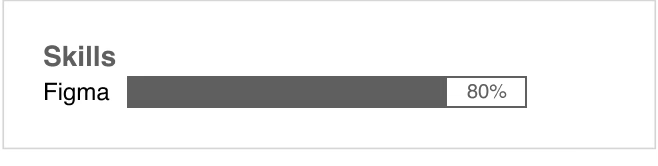
It means nothing. And you’ll have just told the portfolio reviewer you know nothing about good information design.
Also, be wary of presenting your career as a timeline. Careers can be messy things, and timelines can quickly become congested. It’s often more effective to use a simple table or list.
Documents and artefacts
Documents and artefacts are essential. They help us work through and develop ideas. Documents also help us persuade, inform and involve other people.
But they’re part of our job, not all of it. We shouldn’t encourage hiring managers to judge us on our documents alone.
As a general rule, avoid providing complete documents and artefacts. Use them in the same way as photographs instead. Deliver enough of the document to communicate your point and no more. Crop so only the essential is shown. Then add a caption. Handling documents and artefacts this way allows you to put them fully into context.
Video
Video requires more interest and engagement from people than words and pictures on a page.
For this reason, use it sparingly and with good reason. Edit it tightly for length, too — factor in the portfolio reviewer’s lack of time. Provide a transcript.
And if using a clip from a usability research session, ensure you respect privacy laws and show that you have. Hiring managers will notice if you don’t.
Write effectively
In this final section, let’s talk about writing.
If a hiring manager isn’t reviewing your portfolio alone in-between meetings, they’re probably doing so on their solo commute home. So, write to an individual, not a group.
Be informal, but not too much. Use contractions and break the occasional rule — start some sentences with ‘But’ or ‘And.’
Avoid overselling
Drop the hyperbole if you want to be taken seriously.
If in doubt, write as you speak. I’ve critiqued hundreds of portfolios over the past few years. When I can’t understand a sentence, I ask the portfolio owner to explain the text further. What they reply with is always much clearer than what they’ve written.
Use active voice
Writing in an active voice rather than a passive voice will bring your stories alive.
In passive voice, the subject of the sentence is acted upon. For example:
Collaborative workshops were attended by key stakeholders.
In active voice, the subject of the sentence is performing the action. It’s much stronger:
Key stakeholders attended collaborative workshops.
Think short
As advertising legend David Ogilvy famously wrote, “Use short words, short sentences, and short paragraphs.”
Aim for 20 words or less per sentence and five sentences per paragraph.
However, don’t take David Ogilvy’s advice on writing literally. It’s boring if every sentence is the same length. Vary the sentences to avoid monotony and boredom. Look to create a pleasant rhythm.
In general, stick to one point or message per sentence. That’s a good rule of thumb. More complex text will slow portfolio reviewers down.
Watch for commas
If there’s more than one, you can probably simplify the sentence. Or maybe it’s time to use a list.
Avoid jargon
As the novelist and journalist George Orwell advised, ‘Never use a foreign phrase, a scientific word or a jargon word if you can think of an everyday English equivalent.’
Jargon tends to obscure meaning, so lose it. Even the most experienced UX practitioners will be grateful.
Essential words only
When editing (not writing), ensure that every word is essential. Each word should earn its place on the page. If it is possible to lose a word, don’t hesitate to remove it.
Use lists
If you can use bullets to list content, then do so.
A single sentence followed by a list of two items is easier to read than a sentence full of commas.
Try to avoid two or more levels of bullets. Re-write your content instead.
Link purposefully
Sending a portfolio reviewer off to another website or prototype involves risk. Link out only when you believe there is real value in doing so.
Make sure you regularly check any links you include. Don’t just verify that the website exists. Ensure the content is also what you expect. There’s no value in sending hiring managers to a website that has changed significantly since you worked on it.
If you want to include links in your PDF portfolio, use a link shortener and give the short URL as the link. It means reviewers can still view the URL if they print the PDF portfolio. You can also track how many times the link has been used.
Next: Chapter 5, in the bookPlanning your UX Portfolio →
Get the whole book
All ten chapters, plus the Portfolio Planner, the Case Study Canvas and the UX Portfolio Checklist.